- Call Us! (+357) 23 721 721
- Mail Us! [email protected]
Follow us on instagram


Welcome! Nice to meet you!
About the Marina Hotel
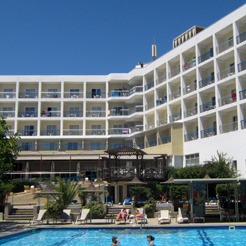
The Marina is a 3-Star family owned and run Hotel. Guests enjoy its relaxed atmosphere, personal service, friendly long serving staff, and good food.
It is ideal for couples, families with children and young couples who come to spend their holidays in Ayia Napa... |read more|

This template has support for 16 module positions. All module positions are collapsible. If no modules are published on some module positions, those module positions will automatically collapse.
Sparky framework allows you to add more module positions (if you need them) easily with user-friendly drag and drop technology. To check this, open template parameters and go to the Layout Designer tab.
The image that you can see on the right side represents a "map" of all default module positions of Hot Academy template.
 Adding new module positions and changing existing module positions is easy with Sparky's Layout Editor
Education is the key to success! People are learning and extending their knowledge from the cradle to the grave. Kindergartens don't exist just to keep children while their parents are at work, but also to educate them while kids are having fun. Time that children spend in elementary school is maybe the most important in life. In high schools, young people make crucial decisions about their future life and work. Finally, the universities are where people are becoming experts for specific fields of science. But, the education doesn't stops there. Even graduates and those who are active workers must learn and extend their knowledge in order to be up to date with modern trends in their field. That's why we have courses, seminars, meetings and similar events where people are sharing their findings from practice. In the Internet era, online courses are not rarity. Actually, they are very popular, so it's possible to study and graduate an university degree completely online!

Internet is a perfect place for sharing knowledge and learning online because it allows students and teachers to communicate easier between each other and also more efficiently. Hot Academy template can be used for development of Joomla site for any kind of educational institution including universities, academies, elementary and high schools, etc. It comes integrated with jEvents component which allows making online class schedules. This is a handy feature and per our opinion it's very useful for educational websites.
 Commercial aspect is also important here. The key to success of every educational institution is to be attractive for the new students. Hot Academy is a responsive template and it looks good on all devices, no matter how students and teachers are accessing it: from the office using portable computer or from the nearby park using tablet or smartphone. In order to attract visitors of the site, you can use any (or all) of modules that are included with template free of charge.
- Responsive template, based on valid and clean CSS code, powered by Sparky Joomla template framework for Joomla.
- 3 pre-defined styles with different colors. All colors are easily customizable in Sparky options (infinite color options).
- Customization of the template's layout and adding/removing module positions is easy. It's powered by Sparky's drag'n'drop Layout Editor. Change layout and element's dimensions easily whenever you need.
- Hot Full Carousel, Hot Film Tape, Hot Maps, Hot Carousel and Hot Gallery modules are included with Hot Academy template. Full support for jEvents component is included. All commercial modules included in this template are free for you, if you buy template (you save $15 per module). All extensions are pre-installed and configured.
- HotStart (SQL dump) available with both single purchase or membership plan. It copies template with all extensions and demo pages easily.
- 16 module positions are used in our demo. Unlimited number of module positions can be added easily within Layout Editor of Sparky Framework, if needed.
- SEO friendly template code for better success of your site.
- PSD source file and fonts are available.
- Top menu system with presentation of sub-level in drop-down panes. It's converted to button for smaller resolutions and better user experience on mobile devices.
- Tested with IE8+, Firefox, Chrome, Safari, Opera.
- Support for RTL (right-to-left) languages.
About Typography:
Take care about your typography to make better user experience for your readers. How to achieve that?
- Learn more about typography, escpecially about the most often used codes, such as <p>, <h1>, <h2>, <h3>, <img> and <a>.
- This template has valid XHTML, but if you want to keep it like that, you must learn and follow the XHTML principles. Also, if some of your extensions are not XHTML valid, pages based on this component would not be XHTML valid as well (no matter if template itself is valid).
- Familiarize yourself with CSS styles that comes with this template.
- Never copy/paste directly from layout text editors, such as Microsoft Word or OpenOffice. Try to paste text in plain editors first (such as Notepad).
- Use a WYSIWYG editor that comes with Joomla or install a better editor, but always check your code in the editor's HTML mode.
Heading One
Duis autem vel eum iriure dolor in hendrerit in vulputate velit esse molestie consequat, vel illum dolore eu feugiat nulla facilisis at vero eros et accumsan et iusto odio dignissim qui blandit praesent luptatum zzril delenit augue duis dolore te feugait nulla facilisi.
Heading Two
Duis autem vel eum iriure dolor in hendrerit in vulputate velit esse molestie consequat, vel illum dolore eu feugiat nulla facilisis at vero eros et accumsan et iusto odio dignissim qui blandit praesent luptatum zzril delenit augue duis dolore te feugait nulla facilisi.
Heading Three
Duis autem vel eum iriure dolor in hendrerit in vulputate velit esse molestie consequat, vel illum dolore eu feugiat nulla facilisis at vero eros et accumsan et iusto odio dignissim qui blandit praesent luptatum zzril delenit augue duis dolore te feugait nulla facilisi.
Heading Four
Duis autem vel eum iriure dolor in hendrerit in vulputate velit esse molestie consequat, vel illum dolore eu feugiat nulla facilisis at vero eros et accumsan et iusto odio dignissim qui blandit praesent luptatum zzril delenit augue duis dolore te feugait nulla facilisi.
My mother said to me, "If you are a soldier, you will become a general. If you are a monk, you will become the Pope." Instead, I was a painter, and became Picasso... To have a quote styled like that, use "blockquote" element, like in this sample code: <blockquote><p>...your text here...</p></blockquote>
This is a dropcap style applied to a paragraph of text. To use it, apply class of dropcap to your paragraph of text, in example: <p class="dropcap">...some text goes here...</p>. To edit this style, find class .dropcap in CSS stylesheet file template_css.css.
Notice Styles:
This is a warning message you may use in your text. Simply add appropriate class to your paragraphs to achieve this effect. Here's a sample code: <p class="warning">...your text here...</p>. The rest of text is just filler. Duis autem vel eum iriure dolor in hendrerit in vulputate velit esse molestie consequat, vel illum dolore eu feugiat.
This is an information message you may use in your text. Simply add appropriate class to your paragraphs to achieve this effect. Here's a sample code: <p class="info">...your text here...</p>. The rest of text is just filler. Duis autem vel eum iriure dolor in hendrerit in vulputate velit esse molestie consequat, vel illum dolore eu feugiat.
This is an error message you may use in your text. Simply add appropriate class to your paragraphs to achieve this effect. Here's a sample code: <p class="error">...your text here...</p>. The rest of text is just filler. Duis autem vel eum iriure dolor in hendrerit in vulputate velit esse molestie consequat, vel illum dolore eu feugiat.
This is typewriter style you may use in your text. Simply add appropriate class to your paragraphs to achieve this effect. Here's a sample code: <p class="typewriter">...your text here...</p>. This style uses a font with constant width of characters.
Paragraphs Marked with a Number/Letter:
1This is a paragraph of text marked with a big number or letter. To make such paragraph of text, you should enter number before the rest of the text in the paragraph, and wrap it in span with a class of p_number, like this: <p><span class="p_number">1</span>...your text here...</p>
2This is a paragraph of text marked with a big number or letter. To make such paragraph of text, you should enter number before the rest of the text in the paragraph, and wrap it in span with a class of p_number, like this: <p><span class="p_number">2</span>...your text here...</p>
AThis is a paragraph of text marked with a big number or letter. To make such paragraph of text, you should enter number before the rest of the text in the paragraph, and wrap it in span with a class of p_number, like this: <p><span class="p_number">A</span>...your text here...</p>
BThis is a paragraph of text marked with a big number or letter. To make such paragraph of text, you should enter number before the rest of the text in the paragraph, and wrap it in span with a class of p_number, like this: <p><span class="p_number">B</span>...your text here...</p>
Unordered and Ordered Lists
Unordered list sample:
- list element one
- list element two
- list subelement one
- list subelement two
- list subelement three
- list element three
- list element four
Ordered list sample:
- list element one
- list element two
- list subelement one
- list subelement two
- list subelement three
- list element three
- list element four
Arrow list sample:
- to achieve this effect
- add class "arrow" to UL
- like <ul class="arrow">
Arrow (left) list sample:
- to achieve this effect
- add class "arrowleft" to UL
- like <ul class="arrowleft">
Calendar list sample:
- to achieve this effect
- add class "calendar" to UL
- like <ul class="calendar">
Check list sample:
- to achieve this effect
- add class "checklist" to UL
- like <ul class="checklist">
Delete list sample:
- to achieve this effect
- add class "delete" to UL
- like <ul class="delete">
Email list sample:
- to achieve this effect
- add class "email" to UL
- like <ul class="email">
File list sample:
- to achieve this effect
- add class "file" to UL
- like <ul class="file">
Folder list sample:
- to achieve this effect
- add class "folder" to UL
- like <ul class="folder">
Hearts list sample:
- to achieve this effect
- add class "heart" to UL
- like <ul class="heart">
Information list sample:
- to achieve this effect
- add class "information"
- <ul class="information">
Lock list sample:
- to achieve this effect
- add class "lock" to UL
- like <ul class="lock">
Pencil list sample:
- to achieve this effect
- add class "star" to UL
- like <ul class="pencil">
Persons list sample:
- to achieve this effect
- add class "person" to UL
- like <ul class="person">
RSS list sample:
- to achieve this effect
- add class "rss" to UL
- like <ul class="rss">
Shopping basket list sample:
- to achieve this effect
- add class "shop" to UL
- like <ul class="shop">
Songs list sample:
- to achieve this effect
- add class "song" to UL
- like <ul class="song">
Star list sample:
- to achieve this effect
- add class "star" to UL
- like <ul class="star">
Star list sample 2:
- to achieve this effect
- add class "star2" to UL
- like <ul class="star2">
Trash list sample:
- to achieve this effect
- add class "trash" to UL
- like <ul class="tweak">
Tweaks list sample:
- to achieve this effect
- add class "tweak" to UL
- like <ul class="tweak">
Unlock list sample:
- to achieve this effect
- add class "unlock" to UL
- like <ul class="unlock">
Warning list sample:
- to achieve this effect
- add class "warn" to UL
- like <ul class="warn">
Inset Styles:
Block TitleDuis autem vel eum iriure dolor in hendrerit in vulputate velit esse molestie consequat, vel illum dolore eu feugiat nulla facilisi.To make such block of text, wrap it into a span with a class of inset-left. Optionally, inside this span you can add another span with class of inset_title for title. Here's an example: <span class="inset_left"><span class="inset_title">Title</span>...your text goes here...</span>. In a similar way, you can align the block of text to the right. Use inset_right, instead of inset_left. Block TitleDuis autem vel eum iriure dolor in hendrerit in vulputate velit esse molestie consequat, vel illum dolore eu feugiat nulla facilisi. If you need to change width or something else in those blocks, you can edit classes .inset_left and .inset_right in CSS stylesheet template_css.css.
Duis autem vel eum iriure dolor in hendrerit in vulputate velit esse molestie consequat, vel illum dolore eu feugiat nulla facilisi. Duis autem vel eum iriure dolor in hendrerit in vulputate velit esse molestie consequat, vel illum dolore eu feugiat nulla facilisi.
Ready to proceed with a booking? CHECK AVAILABILITY


Copyright © 2016 - Marina Hotel - by anticionline